I recently completed a Proof of Concept (PoC) to understand the internal mechanics of how machines process language. The goal was to learn how data transforms from human words into mathematical numbers and back. This method is the foundation for modern search, allowing a system to find answers based on meaning rather than just matching keywords.
Before any of this can happen, the text is first chopped into tokens — the small chunks an LLM actually reads. I cover that groundwork separately in how tokens work in LLMs.
Foundational Concepts
To understand this architecture, we must define the basic building blocks:

	1. SLM (Small Language Model): This is the "brain" of the operation. Unlike massive models (LLMs) that require huge servers, an SLM is a compact version optimized for speed and specific tasks like understanding text.

	2. Transformer: The internal engine inside the SLM. It uses math to understand how words relate to each other in a sentence.

	3. Embeddings: When you pass text through an SLM, it outputs "Embeddings." These are long lists of numbers that represent the intent and meaning of the text.

	4. Vector DB: A specialized database that stores these lists of numbers. It is built to find "mathematically similar" numbers very quickly.
	5. RAG (Retrieval-Augmented Generation): This is the overall framework. It "retrieves" relevant data from your own sources (like a .csv) to answer a question, rather than the model guessing or hallucinating.
Discriminative vs. Generative AI: This PoC uses Discriminative AI. It "discriminates" or selects the best match from your existing data. It does not "generate" or write new text from scratch.
Solution Overview
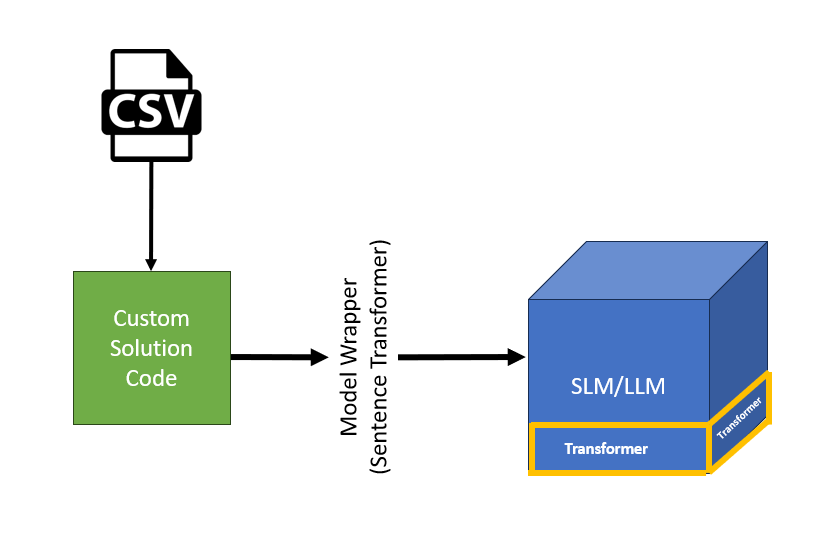
A simple solution as part of my PoC, the green box in the middle is a simple python script that takes .CSV as input and pass that to a Small Language Model in this case the it is all-MiniLM-L6-v2 wrapped by Model wrapper called SentenceTransformer which can be considered as a interface to talk with SLM/LLM
Phase 1: Data Ingestion and Embedding
This phase focuses on converting my raw data in .csv file into a format the machine can understand. in this PoC i am using .CSV however we can pull data from your existing application database—whether it is Relational (SQL) or Non-Relational (NoSQL).
The Process
	1. Ingestion: Loading data from your source into the custom code.
	2. Vectorization: The Model Wrapper (our driver) sends the text to the SLM (all-MiniLM-L6-v2) to create Embeddings.
        3. Persistence: These numbers are saved into the Vector DB (FAISS).
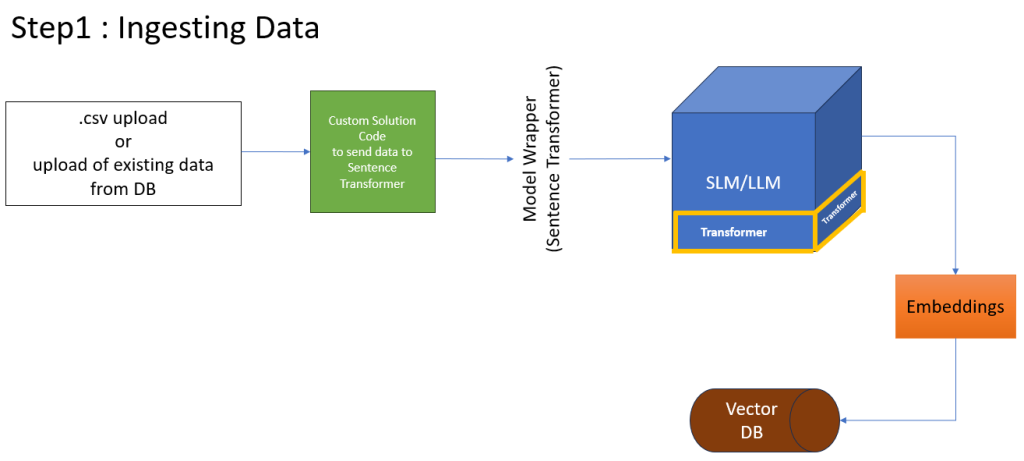
Python Code for Ingestion
.csv file used in this code is available at the end of the blog
import pandas as pd
from sentence_transformers import SentenceTransformer
import faiss
import numpy as np

# 1. Load your "Historical Database"
df = pd.read_csv('tickets.csv')

# 2. Initialize a Small Language Model (SLM) for embeddings
# This model is lightweight and runs locally on your CPU
model = SentenceTransformer('all-MiniLM-L6-v2')

# 3. Convert 'issue' text into Vectors (Embeddings)
# This is the "March 1st" batch process
issue_embeddings = model.encode(df['issue'].tolist())

# 4. Initialize FAISS (my Simple Vector Database)
dimension = issue_embeddings.shape[1]
index = faiss.IndexFlatL2(dimension)

# 5. Add vectors to the Index
index.add(np.array(issue_embeddings).astype('float32'))

print(f"VectorDB created with {index.ntotal} historical tickets.")

# Save the index for future use
faiss.write_index(index, "support_index.faiss")
Code Explanation
# 1. Load the Model Wrapper (SentenceTransformer)
model = SentenceTransformer('all-MiniLM-L6-v2')
# 2. Create Embeddings
# The text is converted into numerical vectors
embeddings = model.encode(df['text_column'].tolist())
# 3. Initialize and store in the Vector
DBindex = faiss.IndexFlatL2(embeddings.shape[1])
index.add(np.array(embeddings))
Line 1-2: We load the SLM into memory.
Line 5: The encode function is the core step where the Transformer turns words into Embeddings.
Line 8-9: We set up the Vector DB and add our numbers to its index.
Phase 2: The Query and Retrieval Flow
This is where the “Semantic Search” happens. Unlike a SELECT…WHERE query that needs exact words, this finds the closest meaning.
The Process
	• Step 1-2: User types a question, and the app sends it to our code.
	• Step 3: The SLM creates a Query Vector (numbers) for that question.
	• Step 4: The code asks the Vector DB to find the closest matching numbers.
	• Step 5: The DB returns the IDs of the best matches.
	• Step 6: The code uses those IDs to look up the actual text in the original data.
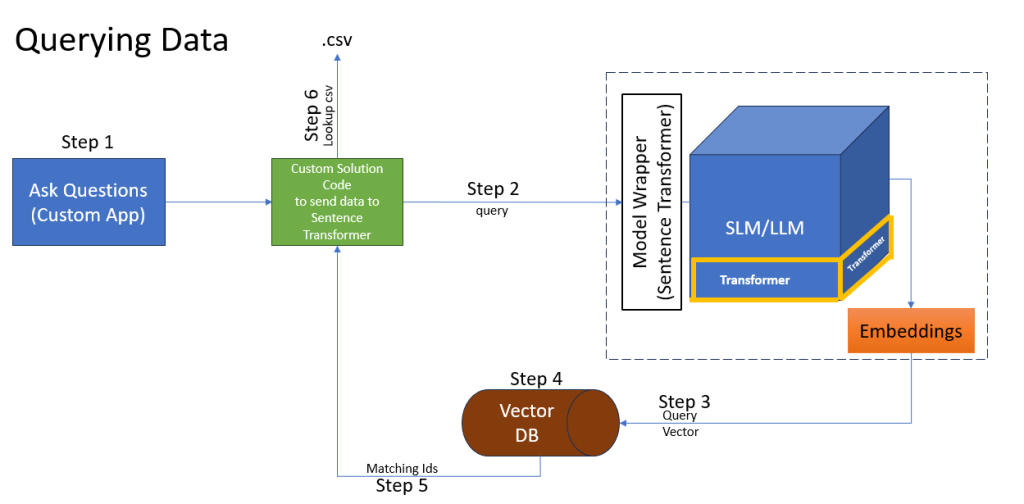
Python Code for Querying
import pandas as pd
from sentence_transformers import SentenceTransformer
import faiss
import numpy as np

# 1. Load the "Brain" and the "Memory"
model = SentenceTransformer('all-MiniLM-L6-v2')
index = faiss.read_index("support_index.faiss")
df = pd.read_csv('tickets.csv')

# 2. Simulate a "New" Support Request (March 2nd)
new_request = "browser is not displaying page correctly"

# 3. Vectorize the new request
query_vector = model.encode([new_request])

# 4. Search the VectorDB (Find top 1 closest match)
# D = distance (smaller is better), I = index in the original list
D, I = index.search(np.array(query_vector).astype('float32'), k=1)

# 5. Retrieve and print the result
match_index = I[0][0]
print(f"New Request: {new_request}")
print(f"Closest Past Issue: {df.iloc[match_index]['issue']}")
print(f"Suggested Solution: {df.iloc[match_index]['solution']}")
Code Explanation
# 1. Convert the Question into a Vector
query_vector = model.encode([user_question])
# 2. Search the Vector DB
# Find the single closest mathematical match
distances, indices = index.search(np.array(query_vector), k=1)
# 3. The Lookup
# Use the ID to get the human-readable text
matched_id = indices[0][0]result_text = df.iloc[matched_id]['text_column']
• Line 2: We turn the user's question into the same "number language" as our data.
• Line 6: index.search finds which stored data point is mathematically closest to the question.
Line 10-11: We translate the result back from a number ID to a human-readable sentence.