The hidden currency behind every AI conversation — explained from scratch
A beginner-friendly deep dive, with real examples from Ollama.
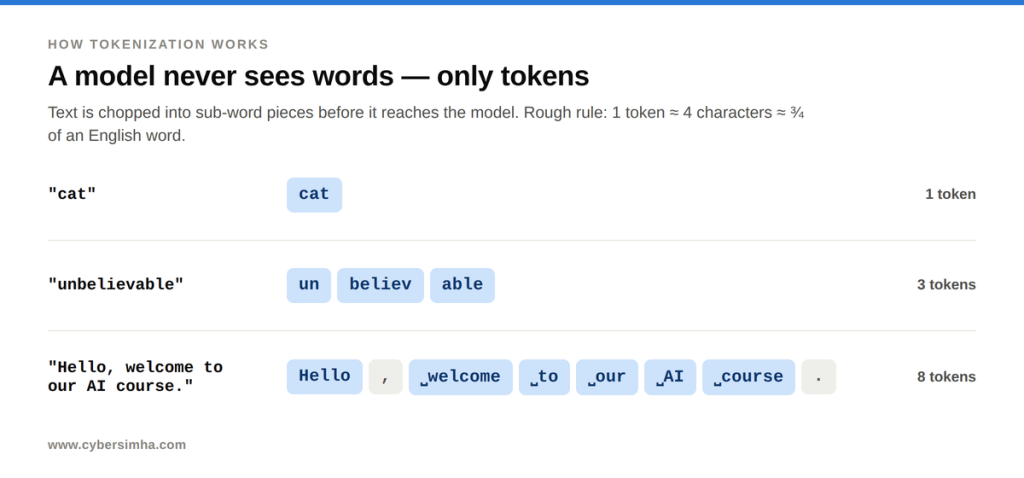
A token is the small chunk of text an LLM actually reads and writes — usually part of a word, not a whole word. As a rough rule, 1 token ≈ 4 characters ≈ three-quarters of an English word. Every AI model measures cost, speed and memory in tokens, not words.
If you have ever wondered why an AI charges you “per token,” why the same message can suddenly cost more tokens on the second try, or why a Word document costs more than plain text — this guide unpacks all of it. No math, no jargon: just clear ideas and worked examples. Tokens are the single most important unit to understand before building anything with large language models (LLMs).
1. What Is a Token in an LLM?
A token is the small chunk of text that an LLM actually reads and writes. It is usually a piece of a word (a “sub-word”), not always a whole word. The model never sees letters or full sentences — it only ever sees tokens.
Once text is split into tokens, the model compares meaning rather than exact words — I unpack that separately in my deep dive on how machines understand text.
- Rough rule of thumb: 1 token ≈ 4 characters ≈ three-quarters of an English word.
- Example: “unbelievable” may split into three tokens: un + believ + able. The word “cat” is a single token.
- Why sub-words? It lets the model handle any word — even new, rare, or misspelled ones — by combining familiar pieces, instead of memorising every word in existence.
- The “rulebook” for splitting: Popular schemes are BPE (used by GPT-3/GPT-4) and SentencePiece (used by LLaMA and PaLM). Each decides how text gets chopped into tokens.
You can see this for yourself in OpenAI’s Tokenizer — paste any sentence and it shows the exact token split. The tokenizer behind GPT-style models, tiktoken, is open source if you want to see how the splitting actually works.
Key idea: Token Efficiency
Token efficiency means how much meaning you pack per token. More meaning per token = lower cost, faster replies, and more room in the model’s memory. You pay and wait per token, so waste directly hurts.
2. Why Do AI Models Charge Per Token?
Most people expect billing per word. But providers charge per token, and there is a solid reason.
- The model works in tokens. Text is chopped into tokens before it reaches the model. It reads and writes only tokens, so tokens are its natural unit.
- Words are inconsistent; tokens are even. “a” and “antidisestablishmentarianism” are both one word but wildly different sizes. Tokens keep the unit roughly uniform, so billing is fair.
- Work happens one token at a time. The model generates output one token per step, and each step costs about the same computation. So 100 tokens ≈ 100 steps of work — speed maps directly to token count.
- A simple analogy. A taxi charges per kilometre, not per “trip,” because trips vary hugely. Tokens are the LLM’s kilometres — a fair measure of the actual distance travelled.
- Languages differ. English is efficient (~¾ word per token). Hindi, Tamil, or code often need more tokens for the same meaning, so they cost more per sentence.
3. How LLMs Generate Text One Token at a Time
An LLM has exactly one skill: predicting the next token, given everything so far. It does not write a whole sentence at once.
Worked example — you ask: “The sky is”
- Step 1 → predicts blue
- Step 2 → reads “The sky is blue,” predicts and
- Step 3 → reads “The sky is blue and,” predicts clear
- …and so on, one word-piece per step, until the answer is complete.
The consequence: each step is one full pass through the model. A 100-token answer = 100 passes; a 500-token answer = 500 passes. More tokens → more steps → more time and cost. This is also why you see AI chat apps “type” word by word — you are watching each token get produced live.
4. Do Spaces and Punctuation Count as Tokens?
- Single spaces are (almost) free. In GPT-style tokenizers the space is glued to the front of the next word and travels inside that word’s token. The token for “welcome” is actually ” welcome” — space included.
- Punctuation is NOT free. A comma or period is its own separate token.
- Example — “Hello, world.”: Hello + , + ␣world + . = 4 tokens (one space absorbed, both punctuation marks separate).
- Extra whitespace DOES cost. Double spaces, tabs, and newlines each become their own token — which is why messy code and HTML waste tokens.
5. Formatting Costs Tokens: Clean Text vs. Raw HTML
A common question: if I feed a .docx, .pdf, or .html file that contains both formatting and content, does it cost more tokens than plain text? The answer is yes — unless a parser strips the formatting first. The model counts tokens on whatever text it actually receives, tags included.
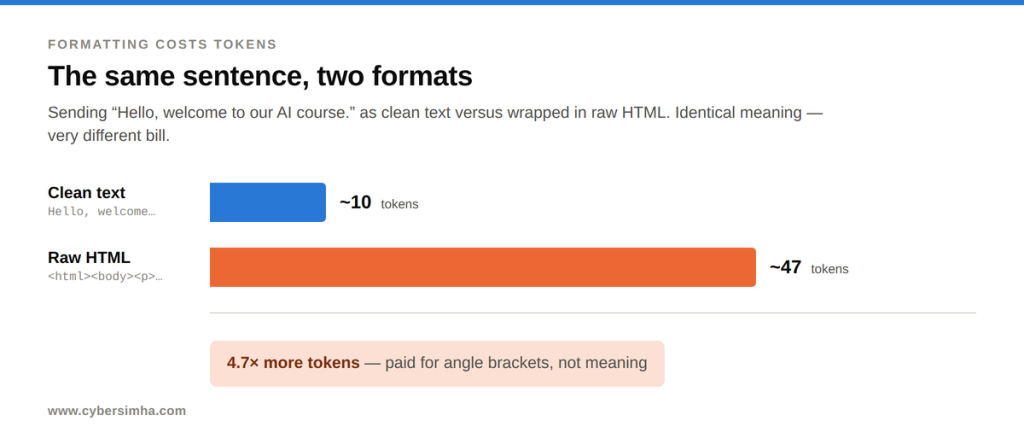
Live demo — the same 6-word sentence, two formats:
| Format | What was sent | ~Tokens |
| Clean text | Hello, welcome to our AI course. | ~10 |
| Raw HTML | <html><body><p style=”…”>Hello, welcome to our AI course.</p></body></html> | ~47 |
Result
Raw HTML costs ~4.7× more tokens to say the exact same thing.
Every < > " ; : # / and each tag word (html, body, style, font-weight) becomes its own token. The formatting — not the meaning — eats the budget. A messy HTML page can be 2–5× the tokens of the same clean text.
Practical takeaway: Always extract clean text before sending documents to an LLM. Sending raw markup wastes money, latency, and context space. This is exactly why RAG pipelines clean and chunk text before use.
A note on PDFs: A PDF often has no clean text layer (it may be scanned images). It is then read via vision/OCR, and images are counted under a different token scheme — see below.
6. How Image Tokens Work in Vision Models
- Images are not read as words. An image is sliced into small squares called patches (like mosaic tiles), and each patch becomes a token.
- Size drives the count. Bigger / higher-resolution image = more patches = more tokens. Large images are split into a grid of tiles, plus one “overview.”
- Rough numbers (OpenAI-style). A small image ≈ 85 tokens; a larger one ≈ 85 + (170 × number of tiles), reaching hundreds to 1,000+ tokens.
- The lesson. An image is often as expensive as a paragraph or a full page of text. “A picture is worth a thousand words” is almost literal in token terms.
7. CSV vs Markdown Tables: Which Uses Fewer Tokens?
To a model, a table is just text with a lot of separators — so it is token-hungry.
- No real grid. A table is flattened into a stream of text, cell by cell, left to right, top to bottom.
- Separators cost tokens. Every |, comma, tab, and newline becomes its own token.
- Example — one CSV row Ram, 25, Delhi: ≈ 5 tokens for 3 values; the two commas are pure overhead.
- Format ranking (cheapest → most expensive): plain text / TSV → CSV → JSON → Markdown table. Markdown tables are worst — all those | and — lines add many tokens for zero meaning.
- Tip. For feeding many rows to an LLM, prefer CSV or compact JSON. Save pretty markdown tables for humans, not the model.
8. How to Read Ollama’s Token Counts (Real Example)
Running a local model with ollama run llama3 –verbose prints the real token stats. Here is a genuine experiment: the same line — hello, welcome to our AI Course. — was sent twice in the same session. The token counts looked wildly different. Here is why.
8.1 Why the First Prompt Showed 18 Tokens
The visible words are only ~8–9 tokens. The rest are hidden “chat wrapper” tokens that the tool adds automatically so the model knows who is speaking. You never see them, but the model does.
| Part | Example | ~Tokens | Purpose |
| Start marker | <|begin_of_text|> | 1 | Conversation begins |
| Role open | <|start_header_id|>user<|end_header_id|> | ~3 | “User is talking now” |
| Line breaks | \n\n | ~1 | Formatting |
| Your actual words | hello , welcome to our AI Course . | ~8–9 | The real content |
| End-of-turn | <|eot_id|> | 1 | “User is done” |
| Assistant cue | <|start_header_id|>assistant… | ~4 | “Now you reply” |
| Total | ≈ 18 | Matches prompt eval count |
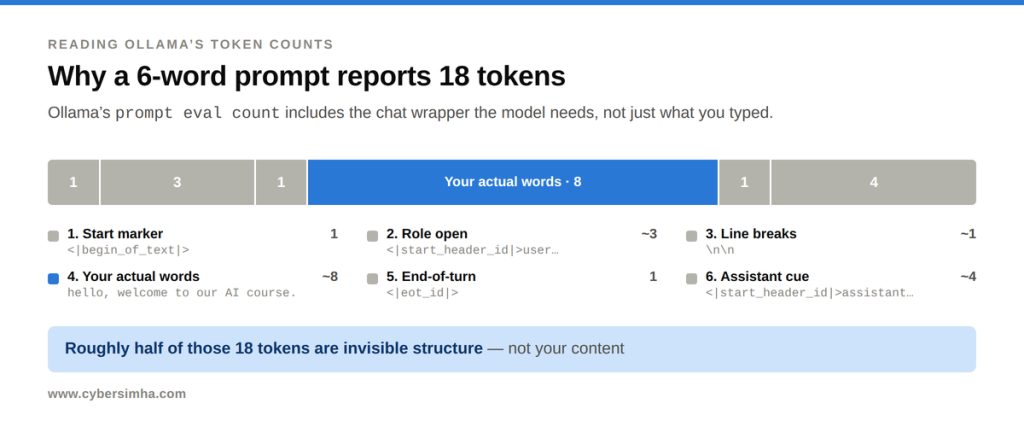
Takeaway: Roughly half of those 18 tokens are invisible structure, not your text. Every single turn pays this small “wrapper tax.”
8.2 Why the second identical prompt jumped to 91 tokens
In an interactive chat, the whole conversation so far is re-sent every turn. So the “same input” was not the same input the second time — it carried all the earlier chat with it.
| Metric | 1st run | 2nd run | What it means |
| prompt eval count | 18 | 91 | Total INPUT tokens read this turn. 2nd time = 1st prompt + 1st reply + 2nd prompt. |
| prompt eval cached | — | 73 | Of those 91, 73 were remembered from before and reused (not recomputed). |
| eval count | 56 | 57 | Tokens GENERATED in the reply (output). |
| eval rate | 5.33 t/s | 5.08 t/s | Speed of writing the reply. |
Every field shown here is documented in Ollama’s API reference.
The arithmetic that reconciles it
Cached (73) ≈ first prompt (18) + first reply (56) = 74  (off by ~1 due to boundary tokens).
Cached (73) + newly processed (18) = 91 = the reported prompt eval count.
Only the genuinely new ~18 tokens cost fresh work. The reused 73 come from the KV cache — stored computation the model reuses instantly. This is why later replies stay fast even as a chat grows.
9. What Is a Context Window in an LLM?
- What it is. The maximum number of tokens a model can hold in mind at once. Your input plus its output must fit inside this budget — the model’s short-term memory size.
- Analogy. A whiteboard of fixed size. Once it is full, adding new text means erasing old text. The model only “sees” what is currently on the board.
- Typical sizes. Older models ~8k tokens; modern ones 128k; some (Gemini 1.5) reach 1M+. 128k ≈ a 300-page book.
- It is measured PER REQUEST. Not per single prompt, and not per stored chat. But because a chat re-sends its whole history each turn, the effective rule is: “your entire ongoing conversation must fit.” That is exactly why the Ollama count grew 18 → 91.
- Bigger is not always better. Very long contexts often reduce focus — models can miss facts buried in the middle (the “lost in the middle” problem).
- How engineers manage it. Retrieval-Augmented Generation (fetch only relevant chunks), hierarchical chunking, and summarising old context — put the right information in the window, not the most information.
Key Takeaways
- Tokens are the LLM’s currency — you are billed and limited by them, so packing more meaning into fewer tokens is a core skill.
- Generation is one token at a time — so cost and speed scale directly with token count.
- Formatting is expensive — raw HTML/markup and pretty tables can cost 2–5× more; strip to clean text first.
- Chats re-send everything — history accumulates every turn, so prompt tokens grow; the KV cache keeps it fast.
- The context window is a per-request budget — managing what goes into it is the real engineering job.
If you want to put this into practice, see my walkthrough on incremental prompting with GenAI.